Showing posts with label razer. Show all posts

Wednesday, January 11, 2012

Razer Reveals New Concept Gaming Tablet


Razer has certainly been putting out a tonne of new concept gaming hardware. This one's a tablet meant for gaming. Called the Project Fiona Tablet PC(obviously a working title), it houses a next gen Core i7 processor that brings the power of a desktop PC on the go. It has a 10.1" 1200X800 screen. Again rather brave idea, but I'd like to see this one coming out and looking at consumer reaction. Check out the specs and preview video below...

Saturday, August 27, 2011

Razer Reveals New Gaming Laptop - The Razer Blade


Razer who has been teasing us for the entire week with the whole PC Gaming Is Not Dead teaser site has unveiled its secrets. It's a brand new gaming laptop. They are calling it the first true gaming laptop, using their unique user interface, which I must assume was something they worked for the Razer Switchblade. The Razer Blade has a Core i7-2640M 2.8Ghz processor, 8GB DDR3 RAM, and an NVIDIA GT555M graphics cards which has a dedicated 2GB GDDR5 RAM. Sounds...pricey. You can check out the tech specs here. Razer is working in partnership with Hewlett Packard on this one and obviously no price point given for this laptop yet. Check out the preview video and press release below...

Monday, August 22, 2011

What's Razer Up To? PC Gaming Is Not Dead


Something is up with Razer, the PC gaming peripheral brand. They are teasing the PC gaming audience with a viral video that hints that there is going to be a reveal this coming Friday. The website PC Gaming Is Not Dead makes a call to arms to PC gamers and to reject shoddy console ports(tell me about this one). Hard to imagine how a new peripheral can change the fact that bad console ports will exist as long as publishers are half hearted towards the PC as a serious gaming platform. Razer has the Switchblade announced but as a prototype device for mobile PC gaming... I doubt that's it. Will be keeping an eye out on Friday for the reveal.

Wednesday, July 27, 2011

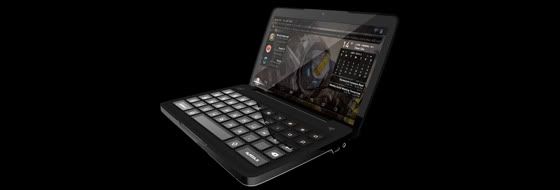
Razer Switchblade To Use Intel Atom Z690 Processor


Razer announced their concept for the Razer Switchblade quite a while back. It is supposed to be a light and small mobile PC gaming device. It was demonstrated playing World of Warcraft back at CES(Consumer Electronic Show). The keyboard is designed just for gaming(so forget about typing emails) with customisable keys that light up when playing different games. The key bindings can be customised for different games. Pretty neat but it's a concept device and I'm unsure whehter the market will take to it considering the fact that you could just get a laptop. Razer announced today that the Switchblade will be powered by Intel's Atom Z960 which is a first. This particular Atom processor is supposed to be a lot more powerful than the previous Atom processors. There's no release date or price point yet for this and they haven't released the full specs for it yet.

Sunday, December 27, 2009

Razer Imperator Review


The Razer Abyssus was a solid gaming mouse but now, I’ve tried the Razer Imperator, and I can say this mouse is a very nice mouse. In fact it  remedies many of the minor niggles I had with the Abyssus. Please bear in mind that the Imperator is a USD$80 mouse(about RM260ish) and is off a different class from the Abyssus.


The first thing I noticed when I opened the box was that the imperator was a much larger mouse. Carrying it on my hand, it felt a lot more heavier(has a bit of weight) than the Abyssus, which is how I like my mice. The design looks sleek and attractive. Good first impression.

 Picture 016


I personally don’t like ergonomic design(ergonomic design of any mouse for that matter). It looks good, but it forced me to hold the mouse the way it wants to be held(it’s not as bad as some other mice). But after 2 weeks, I can say that I’ve got used to it. The top half of the mouse is ruberised giving you excellent grip. Perfectly fine and comfortable once you get used to it.


The Imperator doesn’t have a wonky mouse wheel unlike cheaper mice. The mouse wheel on the Imperator is well built and lasts. No squeaky noise on this mice. In fact the entire mouse is quite well built except for the side mouse button 4 and 5. It’s a thin button that doesn’t quite feel sturdy like other mice buttons(as well as their older Razer mice).


Picture 020


However the thinness of the button has its advantages as well. The positioning of these buttons, just above your thumb makes it impossible to accidently click these button. Pretty smart. On top of that, these button can be adjusted to be more to the front or back(the mouse has an adjustable button below it).


Adjusting DPI on the Imperator is a lot more on the fly. The DPI adjustment button are located on top(I’ve been using it for a long time and you can’t accidently press these buttons), just behind the mouse wheel. Two buttons, one to increase the DPI and another to decrease it. The Razer Imperator has what Razer calls Synapse(on board memory) that allows users to customise their sensitivy settings. The Imperator allows you to customise five different sensitivy settings(using the DPI adjustment buttons you can change) using the drivers available on their website.


razerdriver


I liked the way DPI settings can be changed on the Imperator as it was very convenient when I needed to make smaller mouse movement for 3D design work, I could change it with ease. The technical aspect of the Razer Imperator is highly impressive. Specifications below(click on image to view bigger image):


imperatorspecifications


What’s not listed in the specification is the lift off height of the Imperator. For the uninitiated, that's the height the mouse can be lifted up before the sensors stop accepting mouse inputs. This allows users to use the mouse by lifting it(so you don’t need to make big sweeping movements).


Picture 024


The shorter the height the better. The  Imperator’s lift off height is very good. You could lift the mouse like a regular mouse without worrying about the cursor moving due to the sensor picking up movement when the mouse if lifted. I was very impressed by this. 


Picture 026


The Razer Imperator does its highly impressive technical spec justice. The level of customisation and quality offered in this package is amazing. The only down side to the offering is the thin side buttons does not quite feel like it’s up to the level of build the rest of the mouse is.


Picture 032


Pros:

  • Has a bit more weight
  • Ergonomic design(for right hander)
  • Conveniently placed 4th and 5th mouse button
  • 4th and 5th button can be readjusted
  • High sensitivity(up to 5600dpi)
  • On the fly dpi adjustments much easier.
  • You can customize different levels of dpi to move up or down
  • Very low lift off height = great for those that want to move their mouse by lifting it

Cons:

  • Mouse button 4 and 5 doesn’t feel very solid. It’s a little thin.
  • If you are used to non ergonomic designed mouse, may take a while to get used to this. Designed for right hander's.
  • If you like the Razer symbol to be illuminated all the time, the new breathing effect may not tickle your fancy much


Rating: 8/10


MSRP: USD$79.99


RZR_Imperator_BackV RZR_Imperator_AngledV RZR_Imperator_AngledV02

Sunday, November 29, 2009

Razer Abyssus Review

What’s the most important part of a computer that is vital to a PC gamer? Apart from the graphic cards and CPU that is. Yes you probably guessed right it’s the mouse. It’s the thing which makes PC gaming what it is. The direct feedback you get and the precision that you can never get from a controller. I was fortunate enough to get my hands on the Razer Abyssus, a new mice from Razer, a company that is well known for its high quality peripheral for gamers.

Picture 002

What’s evident to me upon opening the box is that the Razer Abyssus isn’t like your higher end Razer products. It’s a more basic no nonsense mouse. What this means is cutting out the extra buttons and fancy quick macro buttons without sacrificing quality. It’s still a top quality product. It has what you need in a mouse, two button and a mouse wheel(which also acts as mouse button three as usual).

Picture 004

But what I was really impressed with was the fact that it has the sensitivity of a higher end mouse. Simply put, Razer cut out the extra fluff and maintained the quality. Have a look at the specification below:

Razer Abyssus Specification:

3500dpi Razer Precision 3.5G infrared sensor
• 1000Hz Ultrapolling™ / 1ms response time
• Mechanical dpi/polling rate switches
• On-The-Fly Sensitivity™ adjustment
• Always-On™ mode
• Ultra-large non-slip buttons
• 16-bit ultra-wide data path
• 60-120 inches per second and
15g of acceleration
• Three independently programmable
Hyperesponse™ buttons
• Ambidextrous design
• Scroll wheel with 24 individual click positions
• Zero-acoustic Ultraslick™ Teflon feet
• Seven-foot, lightweight, non-tangle cord
• Approximate size: 115mm(L) x 63mm(W) x 40mm(H)

The sensitivity options are placed at the bottom of the mouse. You can can adjust the frequency from 125hz to 100ohz(polling rate, basically how often it refreshes the movement). You can change the dpi from 450, 1800 to 3500dpi. This give you a range of sensitivity that you can pick depending on your preference. My only complaint about this is that the placement of these buttons(at the bottom) makes it easy to accidently press the other mouse buttons.

Picture 008

The top half of the mouse is rubberised, which gives you a good grip and the other bottom half is mostly in a glossy black finish(you could get fingerprint smudges easily if you thumbs wonder to much to the side). The mouse fit my hand perfectly and is of a good size(not at all like a puny laptop mouse). However, its quite light and doesn’t have much weight to it which may turn off some people who prefer their mice to feel heavier. Eventually I got used to its weight and it became a non issue.

Picture 011

All in all the Razor Abyssus is a good entry level gaming mouse that has the sensitivity of a high end gaming mouse for a much lower price(it has an MSRP of RM149). If you are looking for a good optical mouse that offers precision with an affordable price tag and without the extra buttons, the Abyssus does a good job fulfilling this role.

Price(MSRP) : RM 149

Pros

  • Great value
  • Good quality
  • Good grip
  • Very precise and sensitive
  • Good size

Cons

  • A little light
  • No extra buttons
  • Sensitivity adjustments not in the most convenient place
  • May develop squeaky noise(mouse wheel) after prolonged usage of mouse wheel

Review Rating : 7/10

Rzr_Abyssus_SideviewRzr_Abyssus_SportCardview Rzr_Abyssus_Bottom

Rzr_Abyssus_Topview